
Get Paid On Time, Every Time
Collect rent by ACH bank transfer or card, switch every resident to autopay, and let the system enforce your late-fee policy automatically. Money lands in your account and posts straight to the ledger — no spreadsheets, no chasing checks.
Online Payments Residents Actually Use
Give every resident a payment method they already have. Funds settle by next business day and reconcile against the lease automatically.
Residents pay by bank transfer at the lowest cost, or by debit and credit card when they need flexibility. You choose who absorbs processing fees — you or the resident.
Residents enroll once and rent is drafted on the due date every month. Autopay adoption is the single biggest driver of on-time payment rates.
Cash payment at retail locations for residents without a bank account is on our roadmap. Today residents pay by ACH or card. The payment posts to their ledger the same day.

Nobody wants to think about rent day
Not the person paying it and not the person collecting it. Autopay is set up once by the resident and then the month happens on its own — which is why autopay adoption, rather than reminders, is what actually moves on-time payment.
Late Fees and Ledgers That Run Themselves
Define your policy once and let the platform enforce it consistently across every unit, so collections never depend on someone remembering.
Configure grace periods, flat or percentage fees, and daily caps. Fees assess on schedule and appear on the resident’s ledger with a clear breakdown.
Every charge, payment, credit, and refund is tracked on a running ledger you and the resident can both see, eliminating disputes over balances.
Accept a payment for less than the full balance and it applies to the oldest charge first, so what is still owed has one answer. Formal payment plans and promise-to-pay tracking are not built yet.

The awkward conversation, handled the same way every time
A reminder, then a first notice, then a second, then a demand — each one on your own schedule, each one recorded. Consistency is not a nicety here: selective enforcement is what gets challenged, and the answer to it is a record showing everybody was treated alike.
From a charge raised to money in your account.
Rent is the same handful of steps every month, and the point of the software is that you only do the first one. Everything after it happens whether or not anybody remembers.
- 01
The charge is raised
Rent posts to each resident’s ledger on the schedule their lease sets, alongside anything recurring — pet rent, parking, storage, a utility allocation. One statement, not four.
- 02
The resident pays, or autopay does
They pay by bank transfer or card from the portal or the app. Most set autopay up once and never think about it again, which is the single biggest driver of on-time payment there is.
- 03
The grace period runs
Nothing is late until your own grace period has passed. You set it once — days, flat fee or percentage, and a cap — and it applies identically to every unit, so nobody is charged a fee somebody else was let off.
- 04
The fee assesses itself
If the grace period passes, the late fee posts to the ledger with a breakdown the resident can read. It never depends on somebody in the office remembering to do it on the third.
- 05
It ages onto the collections ladder
Past due, the account moves onto a ladder: reminder, first notice, second notice, demand. It climbs one rung at a time and never skips ahead, and every notice sent is kept — which is the record that matters if it ever goes further.
- 06
The books post themselves
Every charge, payment, fee and credit posts a double-entry journal automatically. The operational record and the financial record cannot disagree, because they are the same event written once.
The rest of it.
Recurring & One-Time Charges
Bill pet rent, parking, storage, and utility allocations automatically alongside base rent on a single statement.
Receipts & Notifications
Residents get instant payment confirmations and upcoming-due reminders by email, and a push notification on their phone if they have the app. Text messaging is not something Villagely sends.
Corrections That Leave A Trail
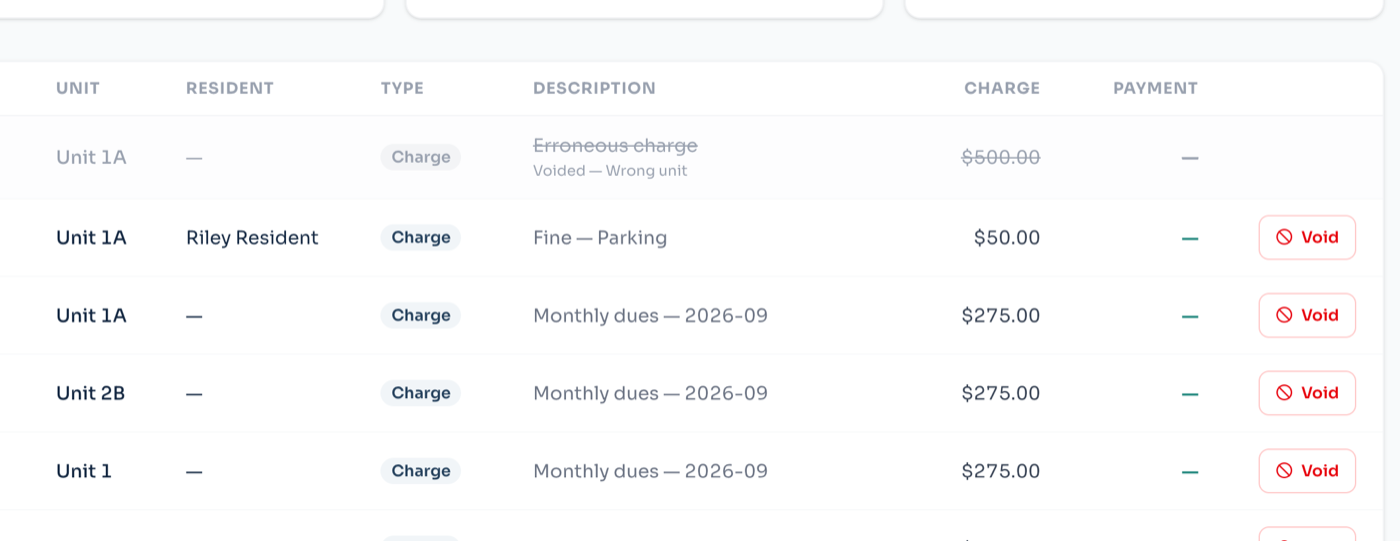
Void an entry and it writes a reversing entry, leaving the original struck through and visible with its reason. Nothing is deleted, because the month you have to explain later is always the month somebody deleted something.
A Collections Ladder That Runs Itself
Overdue accounts age onto a ladder — reminder, first notice, second notice, demand — and only ever move one rung at a time. Every notice sent is kept, which is the record that matters if it ever ends in court.
Ages Debt The Way An Accountant Would
Payments apply to the oldest charge first, so “how far behind is this resident” has one answer rather than a different one per screen.
Owner Disbursements
Sweep collected rent to owners on your schedule with a clear record of what was collected, withheld, and paid out.
Delinquency Dashboard
See aging balances across your whole portfolio at a glance and trigger collections workflows from one screen.
PCI-Compliant Processing
Card and bank data is tokenized and handled by a PCI Level 1 processor, so sensitive details never touch your systems.
Before you ask us.
- How fast does the money actually arrive?
- Card payments settle in about two business days and bank transfers in three to five, which is Stripe’s timetable rather than ours. The ledger updates the moment the payment succeeds, so what a resident owes is right immediately even while the funds are in transit.
- Who pays the processing fee?
- You decide, per organisation. You can absorb it, or pass it to the resident as a separate line so the rent figure stays the rent figure. Bank transfer costs a fraction of card, which is why most portfolios nudge residents towards it.
- What happens when a payment bounces?
- The payment reverses, the balance comes back, and your configured returned-payment fee is assessed. The reversal is posted as its own entry rather than deleting the original — a ledger that can be edited backwards is not a ledger.
- Can I take a partial payment?
- Yes. Partial payments post against the balance and apply to the oldest charge first, so “how far behind is this resident” has one answer rather than a different one per screen.
- What if I make a mistake?
- Void it. Voiding writes a reversing entry and leaves the original struck through and visible. Nothing is ever deleted, because the month you need to explain is always the month somebody deleted something.
- Do I have to use your payment processing?
- No. You can record payments taken any other way — a cheque, a bank transfer straight to you, cash — and they post to the same ledger. You lose autopay and automatic reconciliation, not the record.
Ready to collect rent the easy way?
Rent, leasing, maintenance, the association and the books — one system, set up in an afternoon.